Search without signing in
No account is needed to search. Enter your query directly in the form and browse the returned entries. Start with an artist if you are looking for their music, or include a track name when you want a particular song.

By searching, you agree to our Terms of Use.
Search songs, check matching recordings and access available MP3 or MP4 downloads.
Songs and artists to put on your next listening list.
 Nayvee's PrayerDJ Zinhle, Nayvee Womculo, Young Stunna
 RememberTman Xpress, Mellow & Sleazy
 PoloEmpro, Mlindo The Vocalist
 Myeke (feat. Sne Ntuli)Mshinwemali
 BETHII BETHII (feat. Anathii Deejay & Frostiano)Bello B, Dladla Mshunqisi
 DistanceFEZA, Lwah Ndlunkulu, MaWhoo, FEZA
 Ama hem hem (feat. ShaunMusiq)Thatohatsi, Sjava
 Wo Lo (feat. Sino Msolo & Konke)Mihlali The Guy, Dankie Boi, Mr Thela, Cairo CPT
 Luqale sakudlalaG-Jealous
 Gumba Fire (feat. Mr. JazziQ)Focalistic, Optimist Music ZA, Benzoo, Mellow & Sleazy
The search form takes you from a music query to matching entries and their conversion choices. Follow the three pictured controls to enter your search, open a result and choose an available format.
Type a song title or artist into the search field, or paste a YouTube URL for a specific video. Select Download on the form to begin. Including both the performer and track name helps you recognize the intended recording among similarly named entries.

Review the matching entries before picking a recording. Look at the artist, song name and any details identifying a live version, remix or cover. Use Play when available to check what you have found, then select that entry's Download control to see conversion choices.
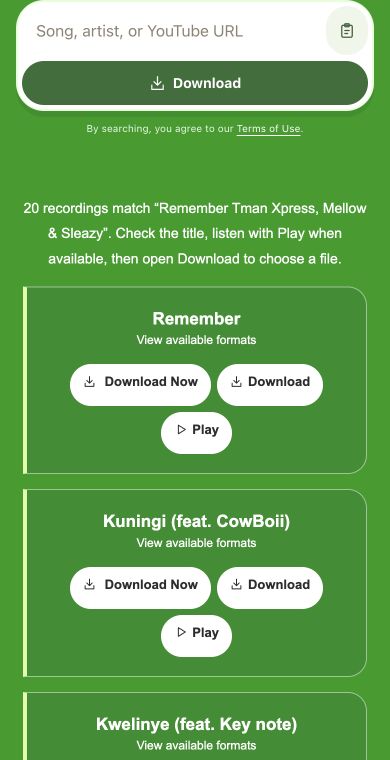
Check the formats offered for the source you selected. Choose MP3 for audio alone or MP4 for video when those options appear. Sources differ in availability, so use the displayed choices as your guide rather than assuming every recording offers both formats.
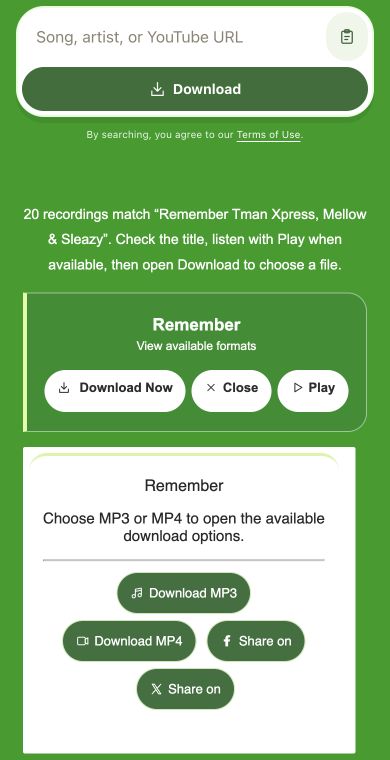
Search with the information you already have, then check the recording before choosing a download. A familiar title, a performer or a specific video can each provide a useful starting point.
No account is needed to search. Enter your query directly in the form and browse the returned entries. Start with an artist if you are looking for their music, or include a track name when you want a particular song.
Found a track on a chart or playlist? Bring its title and artist to the search field. Search for that song individually, then compare the matches with the version that caught your attention. The list supplies the idea, while your query identifies the recording.
Different recordings can share the same title. When Play appears, listen for the voice, arrangement or opening you recognize before proceeding. This can help distinguish an original performance from a cover or live recording without relying entirely on the entry's name.
Use details that identify the recording. A more specific query makes it easier to judge the returned entries, especially when a song has several versions or shares its title with another track.
Pair the track title with the artist's name to give your search a clearer focus. Add live, acoustic or remix if that describes the version you want. Compare those details with each result instead of treating a similar title as an exact match.
If you already know which YouTube video you want, enter its URL in the search field and select Download. This starts from the identified source rather than a title search. Conversion choices still depend on whether that source is available.
The sections on this website suit different starting points. Use Mp3Juice for song searches, Tubidy for mobile browsing, Fakaza for regional music discovery or Ytmp3 when starting with a selected video. Check the relevant section for its entries and available download choices.
| Service | Focus | Start with | Keep in mind |
|---|---|---|---|
| Mp3Juice | Song search and downloads | Title, artist or YouTube link | Check the recording and available formats |
| Tubidy | Songs for mobile listening | Title, performer or chart song | Preview a matching recording when available |
| Fakaza | South African songs and artists | Song title and performing artists | Identify the vocalist or collaboration |
| YTMP3 | MP3 audio from a video | A YouTube video link | Open the available audio format |
These are sections on this website, not claims of affiliation. Sources and formats vary.
Decide whether you need audio alone or video as well. Source quality limits conversion quality, so selecting an output format cannot recover sound or picture detail missing from the original recording.
Select MP3 when it is offered and you want sound without the picture. The audio still reflects the source, including any introductions, crowd noise or differences in performance. Check the recording first if you are looking for a particular arrangement.
Choose MP4 when available if the visuals are part of what you want to save. A performance or music video may matter as much as its soundtrack. Check the selected entry's options, since an available audio choice does not guarantee video.
Yes. Enter the title and use Download on the form. If several performers or unrelated tracks appear, add the artist's name and search again.
Use the same field as a song search. Paste the YouTube URL, select Download, then review the returned entry and open its available conversion choices.
No. The available formats depend on the source. Review the choices shown for your selected entry to see whether audio, video or both are offered.
No account is needed to search. You can enter a title, artist or YouTube URL in the form and review the matching entries without signing in.
No. Those names identify other sections on this website. Their use here does not indicate a partnership, endorsement or affiliation with those services.
Make sure you have permission to download and use the recording. Confirm the performer and version, use Play when available and check the offered formats.
Organize Mp3Juice downloads with clear filenames, stable folders, accurate tags, duplicate checks, backups and playlist-safe moves.
Mp3Juice privacy guide: no account does not mean anonymous. Learn safer search, clipboard, incognito, ad, and shared-device habits.
Prepare Mp3Juice music for offline listening by confirming a completed local audio file, compatible player and network-off playback test.
Articles and information pages are in English.
Enter a song, artist or YouTube URL and select Download on the form. Find the recording you want, then review its available MP3 audio or MP4 video choices.